
PrintNode alternative for thermal receipt printing
PrintNode bills per computer and takes PDF or raw bytes. Receiptful bills per printer and takes HTML. Here is an honest comparison, including the cases where PrintNode is the better choice.
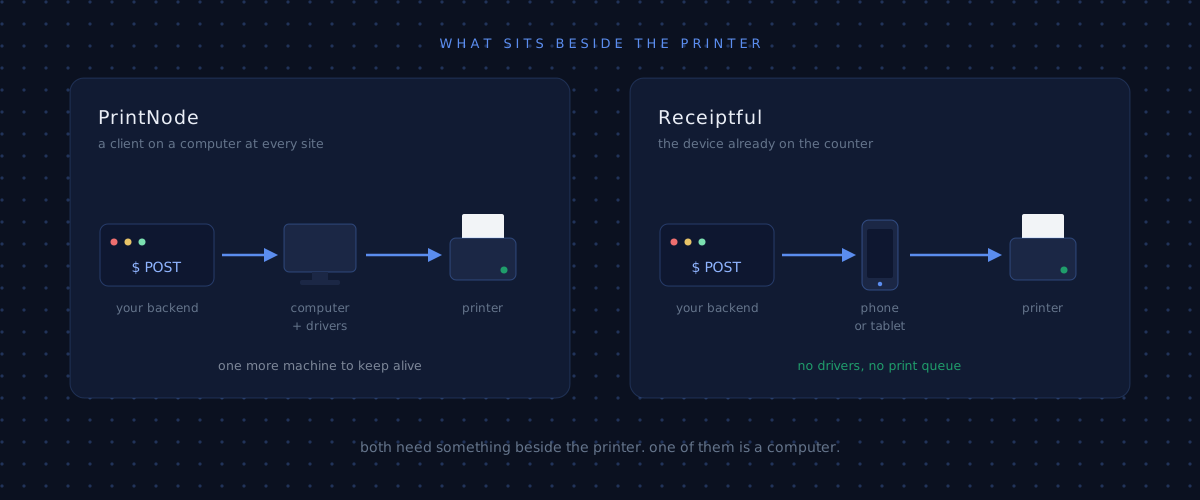
PrintNode is a cloud printing API. You install their client on a computer, that computer reports its printers to their servers, and your backend POSTs print jobs as PDF or raw bytes. It has been the default answer to "how do I print from my server" for years, and it prints almost anything: A4 documents, shipping labels, invoices, receipts.
Receiptful does one of those things instead of all of them. It prints thermal receipts, it bills per printer rather than per computer, and it takes HTML instead of asking you to produce the bytes yourself.
The short version: if you print a mix of document types across an office, stay on PrintNode. If you print receipts from Bluetooth or USB thermal printers, especially across many small sites, this post is about why the second option tends to fit better.
Side by side
Prices checked August 2026.
| PrintNode | Receiptful | |
|---|---|---|
| Billing unit | Per computer running the client | Per active printer |
| Free tier | 50 prints/mo, 1 computer | 20 receipts/mo |
| Entry paid plan | $9/mo, 5,000 prints, 3 computers | $5/printer/mo, 1,000 receipts per printer |
| Overage | $1.80 per 1,000 (falls to $0.49 on Premium) | $0.005 per receipt |
| Runs next to the printer | Windows, macOS, Linux, Raspberry Pi OS | Android app on a paired device, with Windows, macOS and Linux coming |
| Job payload | PDF or raw base64 | HTML, a stored template plus JSON, or raw ESC/POS |
| Receipt authoring | Yours to build | Template editor with live preview in the console |
| Printer types | Anything with an OS driver | Thermal receipt printers |
Both are honest products. They just draw the boundary in different places.
What has to run next to the printer
A receipt printer is a local device. It has no public IP address and no idea your cloud exists, so something physically beside it has to bridge the gap. Every product in this category solves that problem somehow, and the shape of that solution is most of what you are choosing between.
PrintNode's answer is a client you install on a computer. That client is available for Windows 10 and 11, macOS from Big Sur through Tahoe, Ubuntu, Debian, CentOS, and Raspberry Pi OS. People sometimes assume this means a full desktop machine per site, and that is not true: a Raspberry Pi is officially supported and costs very little.
The cost is not the hardware. It is that the machine exists at all.
That box is a computer with an operating system, and it needs someone to own it. It needs to stay powered on, survive its own updates, come back after a power cut, and stay on the network. When a site says "the printer stopped working," the actual answer is usually that the Pi under the counter got unplugged, or CUPS is in a bad state, or the OS rebooted into an update at 3am. Multiply that by the number of locations and it becomes a small fleet you are quietly responsible for.
There is a second requirement that matters more for receipts specifically. PrintNode prints through the operating system's printing subsystem, so the printer must first be a working OS-level printer with a driver behind it. For a USB label printer with a vendor driver, that is fine. For a Bluetooth thermal printer, getting it to appear as a healthy CUPS queue on a Raspberry Pi is a genuine afternoon, and it is an afternoon you repeat per site and per printer model.
Receiptful's bridge is an Android app running on a paired device beside the printer, connecting to it over Bluetooth or USB directly. There are no drivers to install and no print queue to keep healthy. Android is the only platform today, with Windows, macOS and Linux on the way, so if your counter runs a Windows till and nothing else, PrintNode is the one that works right now. In practice this matters because the device is often already there: the tablet the staff take orders on, or a cheap Android phone that costs less than the Pi and has a battery, so a power cut does not take the printer down with it.
You still have to build the receipt
PrintNode accepts four content types: pdf_uri, pdf_base64, raw_uri, and raw_base64. There is no HTML type. That means something on your side has to turn an order into either a PDF sized for a receipt roll or a stream of ESC/POS bytes.
If you go the raw route, you own the details. You are choosing escape codes for alignment and font size, counting characters against the 32 or 48 columns your paper width allows, padding leader dots so prices line up, and discovering that this printer model handles a cut command slightly differently from that one. Libraries like python-escpos and node-thermal-printer help, but they do not remove the work, they relocate it. Every layout change goes back through byte codes. PrintNode also documents that print options have no effect on raw jobs, so anything you might have wanted the API to handle is yours again.
If you go the PDF route you trade one problem for another: you now maintain a renderer that produces correctly sized single-column PDFs, and thermal printers are unforgiving about margins.
Receiptful takes the HTML you already know how to write and renders it for the specific printer model on the other end, including the column width. The rules for laying out receipt HTML are short and mostly about width:
curl https://api.receiptful.io/v1/printers/42/jobs \
  -H "Authorization: Bearer rf_live_3f9c…" \
  -H "Content-Type: text/html" \
  --data '<h1>Order #1284</h1><p>2× Flat White ......... $9.00</p>'
Raw ESC/POS is still accepted if you have already built a renderer and want to keep it. The point is that you are not forced to build one.
There is a third option that has no equivalent on the PrintNode side. You can store the receipt as a template in the console and have your backend send only the data:
curl https://api.receiptful.io/v1/printers/42/jobs \
  -H "Authorization: Bearer rf_live_3f9c…" \
  -H "Content-Type: application/json" \
  --data '{"template_name": "kitchen-ticket", "data": {"order": 1284, "items": [...]}}'
The template lives in a console editor with a live preview beside it, so you can change the layout, watch the receipt redraw, and send a test print to a real printer without deploying anything. Rendering at job time is strict: a variable the template uses but data omits rejects the job with a 422 rather than printing a receipt with a hole in it.
That matters more than it sounds. Receipt layout changes are usually requested by whoever runs the counter, not by whoever wrote the backend. With PrintNode, "can we put the table number bigger" is a code change, a deploy, and a print to check it. Here it is an edit in a browser.
Use PrintNode if
This is where most comparison pages get quiet, so here it is plainly. PrintNode is the better choice when:
- You print more than receipts. A4 documents, invoices, packing slips, and shipping labels with vendor drivers. Receiptful does not do these.
- You have several printers at one site. PrintNode bills per computer regardless of how many printers hang off it. Three printers at one location is $9/mo on PrintNode and $15/mo on Receiptful. PrintNode wins that one outright.
- You already run Windows machines at every location. The client installs onto infrastructure you are already maintaining, and the marginal cost is close to zero.
- You print at high volume from few sites. At 200,000 prints a month, PrintNode's overage falls to $0.49 per 1,000. Nothing priced per receipt competes with that.
- You need a mature, long-established vendor. PrintNode has been doing this for over a decade. That is worth something and it would be silly to pretend otherwise.
What the money actually looks like
The interesting thing about the pricing comparison is how close it is once you have more than a few sites.
One site, one thermal printer, 1,000 receipts a month: Receiptful is $5, PrintNode is $9, since the free Lite plan's 50 prints will not cover it.
One site, three printers on one machine, 3,000 prints: PrintNode is $9, Receiptful is $15.
Twenty sites, one printer each, 800 receipts each, so 16,000 prints in total: Receiptful is $100. PrintNode is $99. The volume fits the $29 Standard plan with room to spare, but its five-computer limit does not, and twenty computers means Premium.
At that scale the subscriptions are within a dollar of each other. The difference is not the invoice. It is that one of those setups involves twenty machines with operating systems on them and the other does not.
Switching
The same job, both APIs. PrintNode:
curl https://api.printnode.com/printjobs \
  -u "your-api-key:" \
  -H "Content-Type: application/json" \
  --data '{
    "printerId": 12345,
    "title": "Order #1284",
    "contentType": "raw_base64",
    "content": "G0AbYQEdIREuLi4=",
    "source": "orders-service"
  }'
Receiptful:
curl https://api.receiptful.io/v1/printers/42/jobs \
  -H "Authorization: Bearer rf_live_3f9c…" \
  -H "Content-Type: text/html" \
  --data @receipt.html
The migration is mostly deletion. The code that produced content in the first snippet is the code you stop maintaining.
Questions people ask
Can I keep my existing ESC/POS renderer? Yes. Send it as raw ESC/POS and it prints unchanged.
What happens if the printer is offline when the job arrives? The job waits until the printer reconnects, up to a lifetime you set per job. After that it expires rather than printing a stale order an hour later. This is deliberate: a receipt for an order that has already left the building is worse than no receipt.
How fast is it? Under 1.5 seconds from API call to paper at the median.
Can I change a receipt layout without deploying? Yes, if you print from a stored template. Edit it in the console, preview it, test print it. Your backend keeps sending the same JSON.
Does Receiptful print labels or A4? No. It prints thermal receipts. If you need label or document printing, PrintNode is the right tool.
Does PrintNode have an Android client? No. Their client runs on Windows, macOS, Linux, and Raspberry Pi OS. Receiptful is the mirror image today: Android only, with the desktop platforms coming.
If you print receipts and the per-site machine is the part that bothers you, start with the free tier and print one from your backend. It takes a few minutes and there is nothing to install on a server.