
A practical introduction to ESC/POS
How applications send text, graphics, cuts, drawer pulses, and status commands to thermal printers — and why reliable printing depends on much more than the ESC/POS byte stream itself.
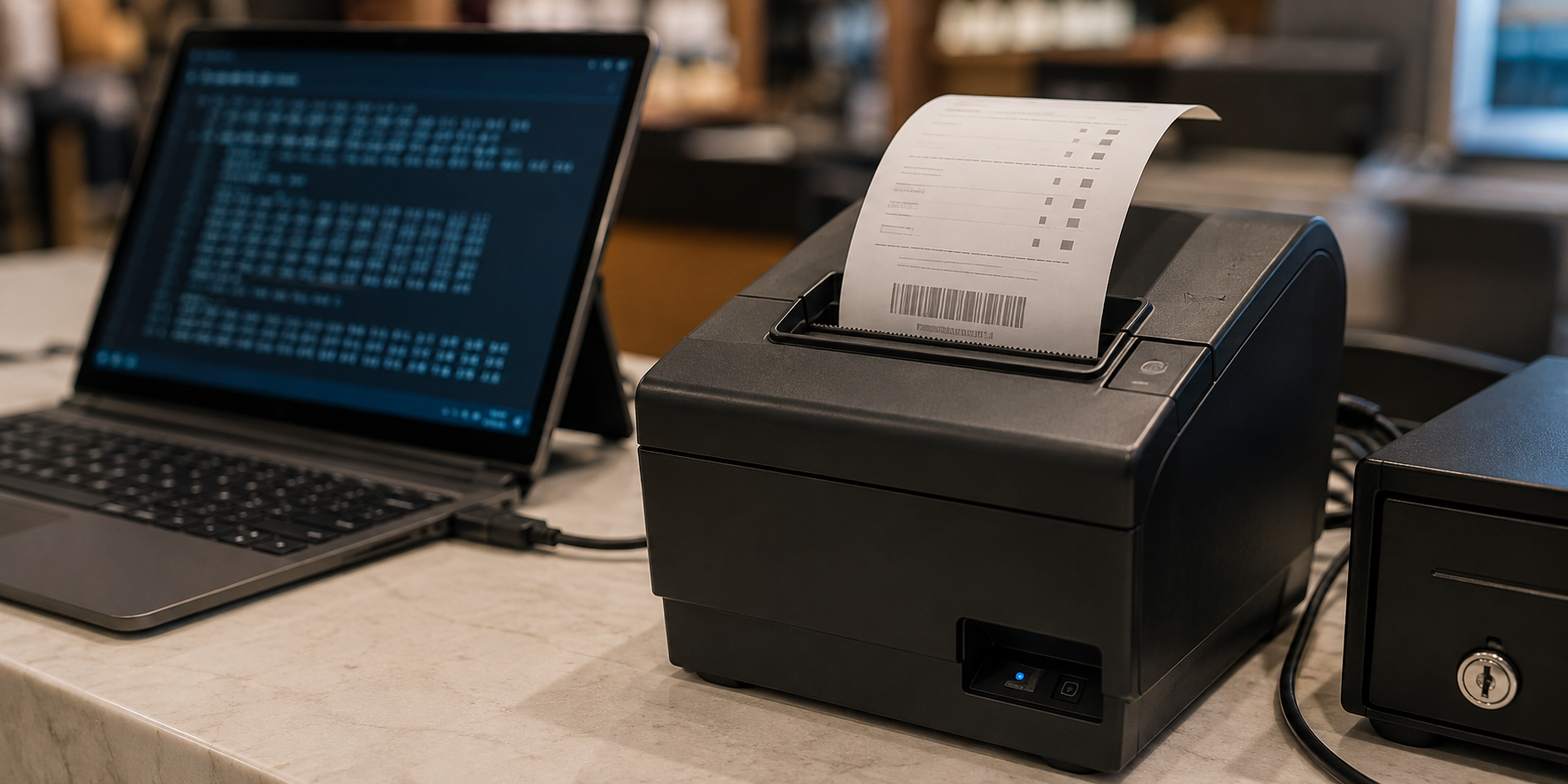
A customer completes a purchase. The payment has gone through, the order has been recorded, and now the point-of-sale system has one final task: produce the receipt.
At first glance, that sounds like ordinary printing: put some text on a page, send it to a printer, and wait.
But a receipt printer is rarely asked to print alone. It may need to center the store name, print a logo or QR code, feed and cut the paper, and — in a cash transaction — open the cash drawer.
These are not only instructions about what the receipt should look like. They operate the printer and the hardware connected to it.
This is the problem ESC/POS was designed to solve.
ESC/POS is a command language originally developed by Epson for point-of-sale printers. An application sends a stream of bytes containing both receipt content and commands such as “align this text,” “print this image,” “feed the paper,” “cut here,” or “pulse the cash drawer.”
A simplified exchange might look like this:
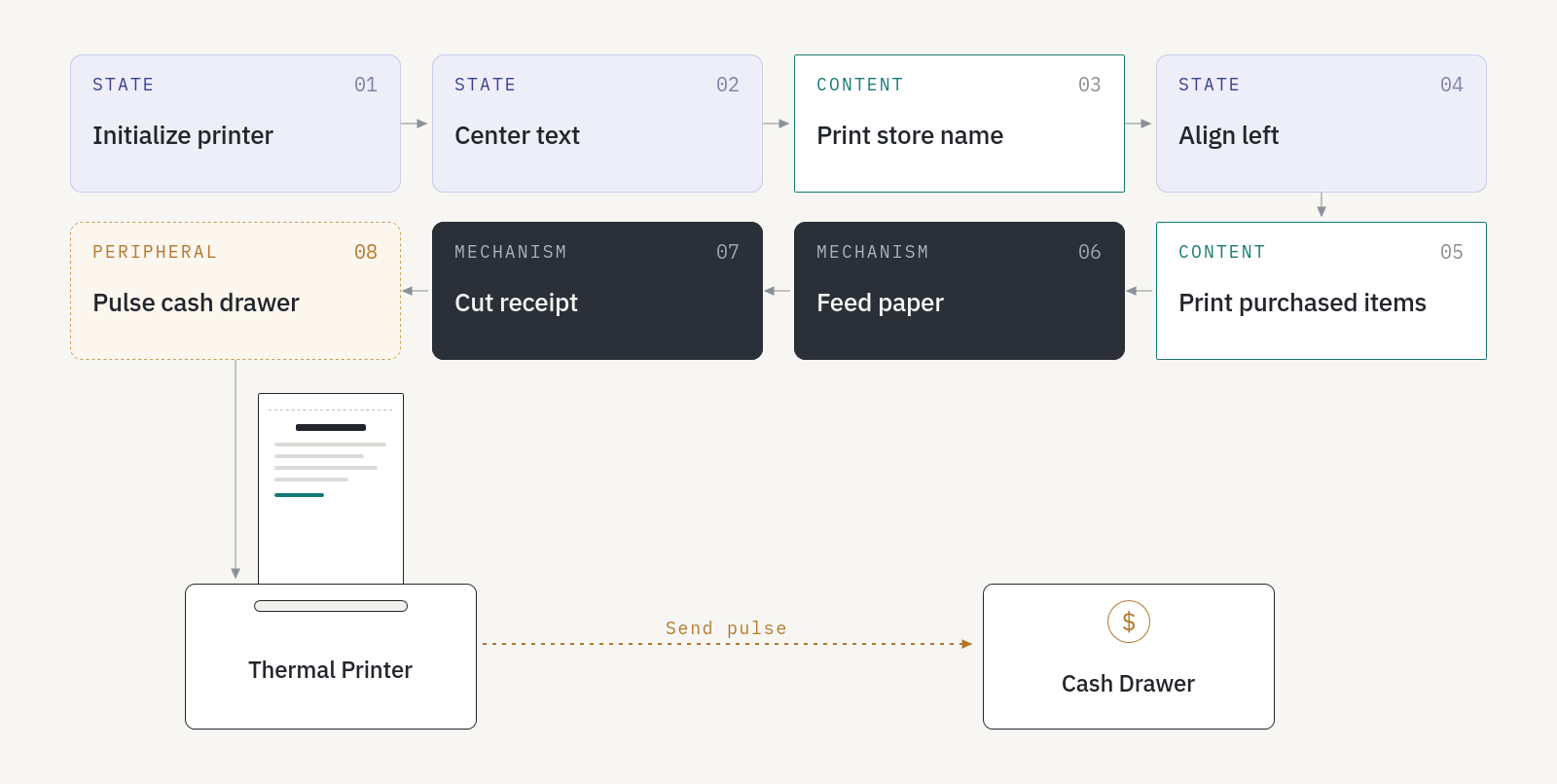
The commands are compact byte sequences, but the idea is simple: the application is having a structured conversation with the printer.
ESC/POS is now encountered beyond Epson’s own printer range, with other manufacturers offering ESC/POS-compatible or emulation modes.1 The underlying model is broadly consistent, but implementations differ in supported commands, parameters, character tables, image formats, status responses, and cutter behavior.
The byte stream is the simple part. The complications begin with transport, compatibility, and reliable delivery.
Why ESC/POS appeared
ESC/POS originated as Epson’s proprietary command system for point-of-sale printers. Epson describes it as designed to reduce processing on the host computer while remaining flexible enough to accommodate future upgrades.2
Those goals shaped a compact and extensible language for direct printer control.
Unlike a PDF or an office document, an ESC/POS print job is not a finished description of a page. The application builds a sequence of instructions and sends them to the printer.
A receipt is a stream of bytes
Consider a very small receipt. The printer does not receive this as a page. It receives a sequence of printable characters, line feeds, and control commands:
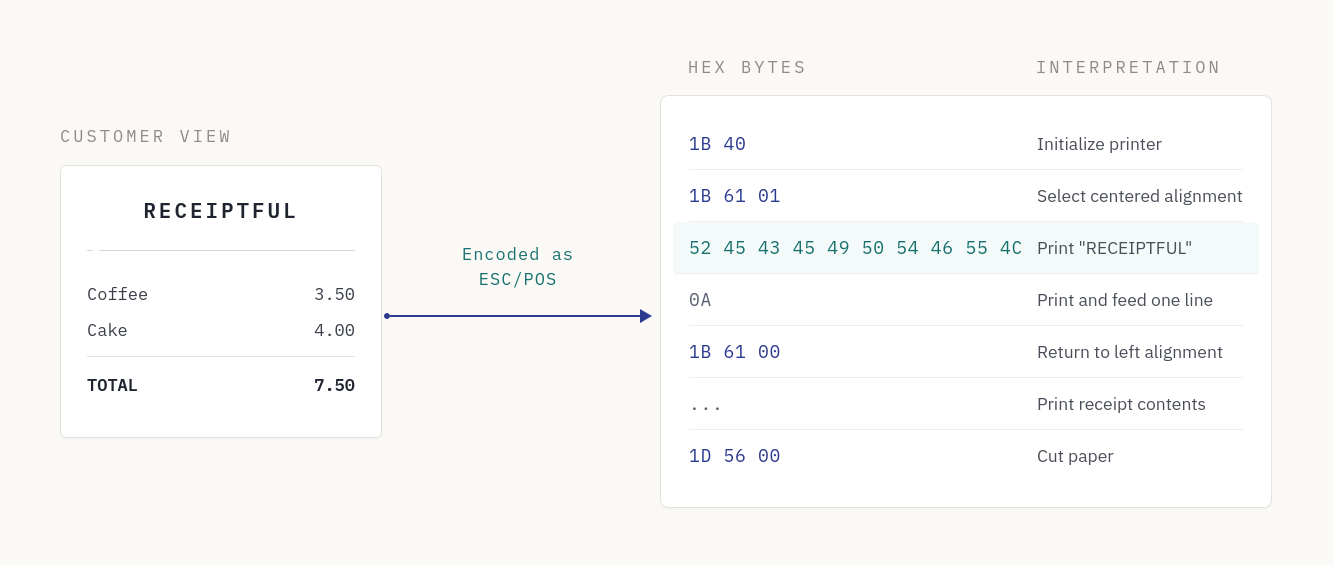
1B is the hexadecimal value of the ESC control character; 1D represents GS, or Group Separator. Many ESC/POS commands begin with a control byte followed by a command identifier and any required parameters.
Here, ESC @ initializes the printer, ESC a 1 selects centered alignment, and GS V 0 requests a paper cut.345 Hexadecimal makes the stream readable to developers; the application sends the actual bytes through a buffer.
Printable content and control commands are interleaved in the same stream. This is the fundamental ESC/POS model.
The printer remembers what you told it
ESC/POS is stateful. After selecting centered alignment, the printer remains centered until another command changes the setting, the printer is initialized or reset, or its power is turned off. The same applies to settings such as emphasis, character size, line spacing, code tables, and print areas.4
This saves the application from repeating every setting before every line, but it can also leak state. If a receipt centers its logo and never restores left alignment, every item below it may be centered as well. A reused connection may even inherit settings from the preceding print job.
Many print streams therefore begin with ESC @ and explicitly set the modes they depend on. The command clears the print buffer and returns printer modes to their power-on state, but it does not erase persistent data such as stored graphics.3
ESC/POS is not the connection
ESC/POS defines the instructions, not how they reach the printer.
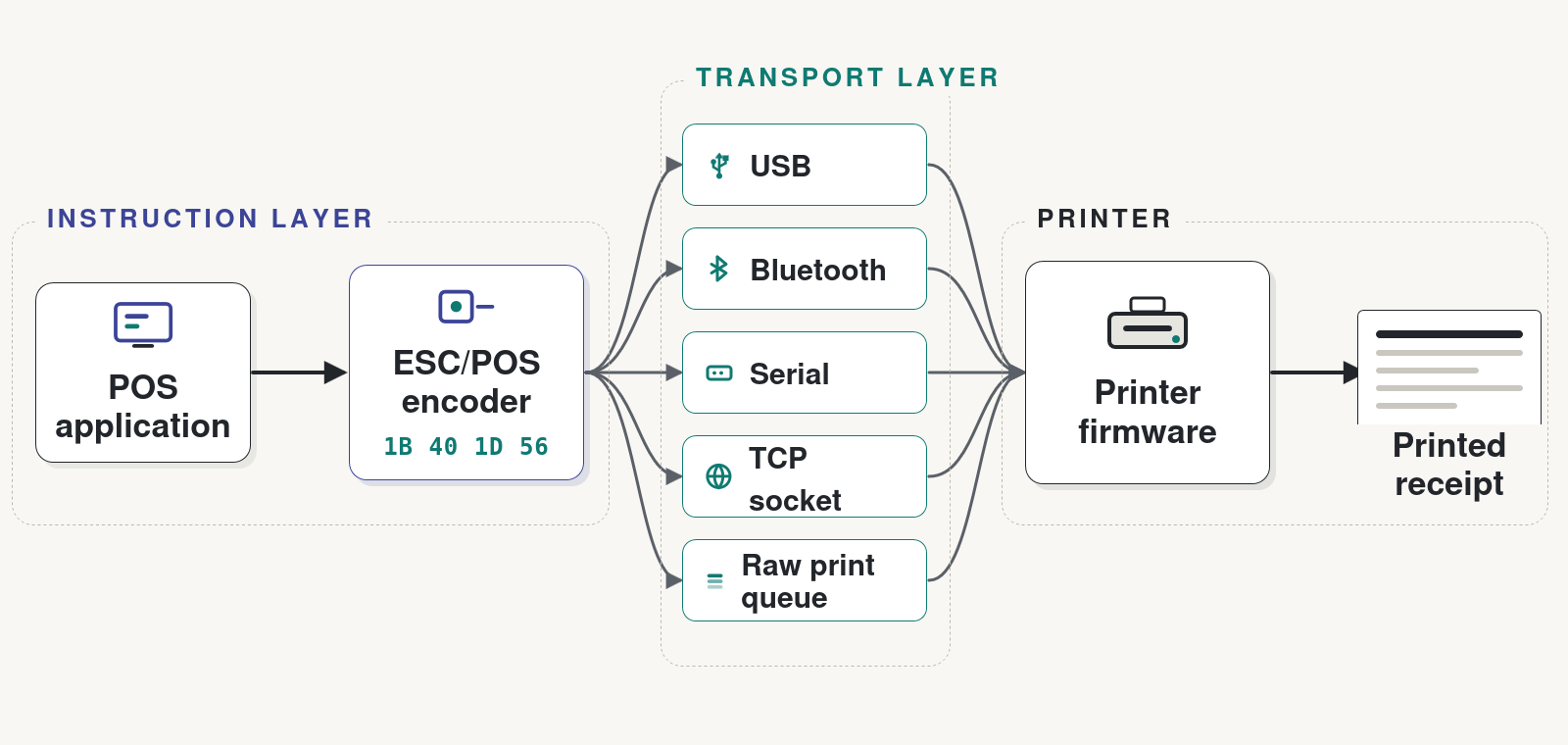
Discovering a Bluetooth device, opening a USB connection, creating a TCP socket, or submitting data to an operating-system queue belongs to the transport layer. The ESC/POS encoder only produces the bytes.
This separation allows a system to reuse the same renderer and encoder with different transport adapters. But transports do not behave alike. Some permit bidirectional communication and status responses; others only allow the application to submit print data. Connection setup, buffering, timeouts, and disconnection behavior also vary.
Epson’s TM-m30II-SL documentation, for example, covers USB, Ethernet, wireless LAN, and Bluetooth connections. For network printing, it specifies a bidirectional TCP socket on port 9100 that transfers both print data and printer status.6
The distinction is simple but important: ESC/POS tells the printer what to do; the transport determines how the conversation happens and what feedback the application can receive.
More than text on paper
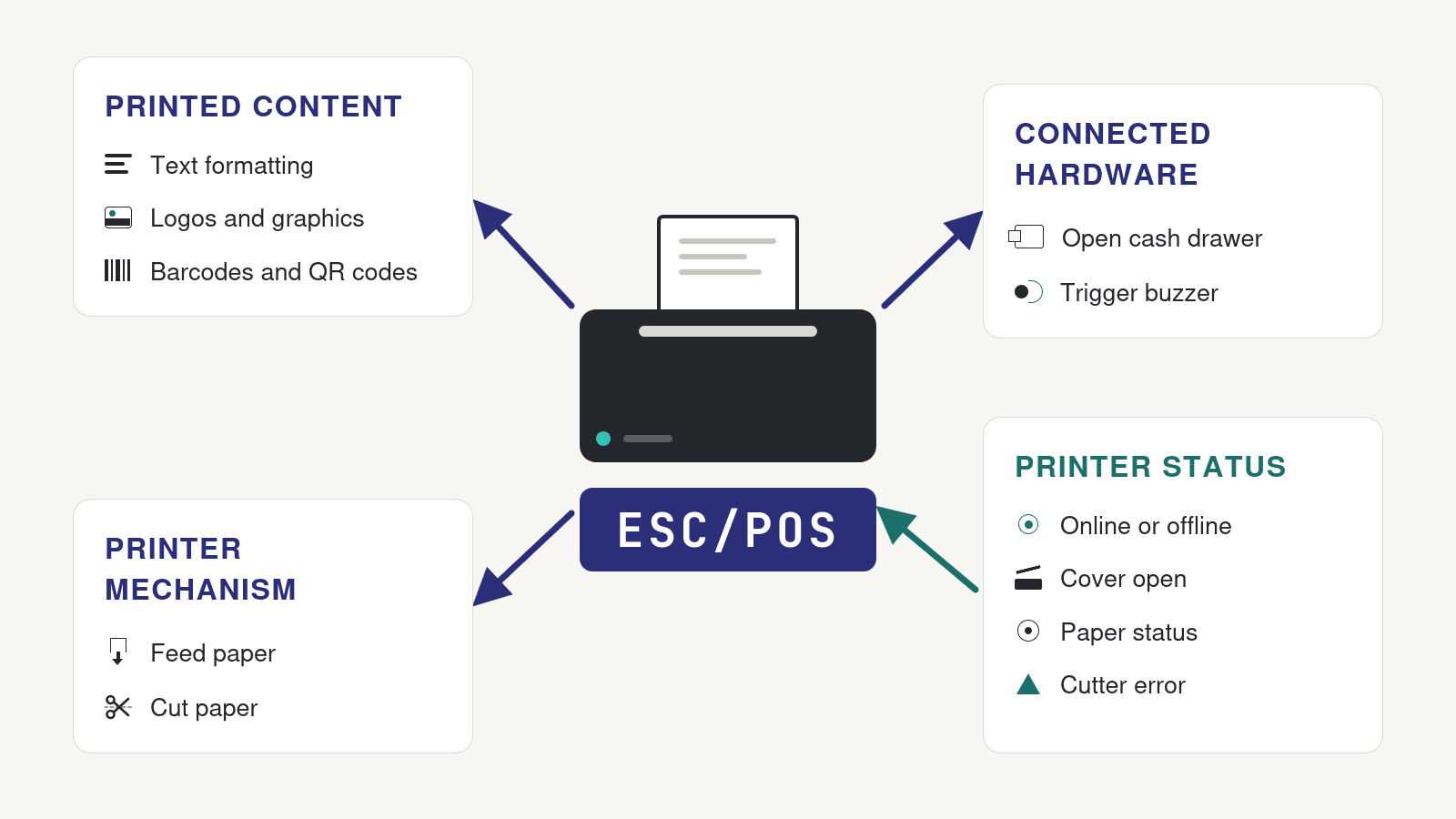
ESC/POS commands can format text, print graphics, generate barcodes and QR codes, feed and cut paper, trigger connected hardware, and request printer status.
The last three capabilities distinguish ESC/POS from a language concerned only with the appearance of a receipt.
Cutting the paper
GS V instructs the printer to cut the paper. Depending on the command parameters and printer model, it may perform a full or partial cut, or feed the paper before cutting.5
Not every printer has an automatic cutter, and supported modes differ. Epson’s reference lists models that support only partial cuts and manual-cutter models that feed the paper without cutting it. Even a basic cut command must therefore be matched to the printer’s mechanism.
Opening the cash drawer
A cash drawer is commonly connected to a dedicated socket on the receipt printer. The application does not communicate with the drawer directly; it asks the printer to send an electrical pulse to the drawer’s release mechanism.
The ESC p command selects a connector pin and specifies the pulse timing.7 On supported printers, the same output may instead drive an internal buzzer, another example of behavior that depends on the hardware configuration.
Reading printer status
Communication can also travel in the opposite direction. With DLE EOT, an application can request real-time status such as whether the printer is online, why it is offline, whether the cover is open, whether paper is present, or whether the cutter has failed.8
The response is a byte whose individual bits represent different conditions. Using it requires a bidirectional transport that can return the printer’s response to the application.
These commands make the broader role of ESC/POS clear: it describes printed content, but also operates the printer and the checkout hardware around it.
Text is where the first surprises appear
Plain ASCII usually prints without difficulty. International text may not.
socket.write("Crème brûlée – 8,50 €");Depending on the printer and its configuration, this may print correctly, produce question marks, or substitute unrelated symbols.
Many ESC/POS printers interpret native text using a selected character code table rather than treating every incoming string as Unicode. Epson’s ESC t command, for example, selects tables such as PC437, PC850, Windows-1252, Cyrillic, Arabic, Hebrew, and various regional encodings. The available tables and their numeric identifiers differ by printer model and region.9
Correct output requires the printer setting and transmitted bytes to agree. Selecting Windows-1252 while sending UTF-8 does not produce Windows-1252 text.
Some newer printers support UTF-8 directly. Epson provides a separate command to enable UTF-8 on supported models, in which case the selected single-byte code table is ignored.10 This remains a printer capability, not something an application can assume across all ESC/POS devices.
When the printer cannot render the required characters — or when exact typography matters — the application can render the text into an image and print the resulting pixels. Rasterization is more predictable across languages and printer fonts, but produces more data and moves layout and font rendering into the application.
The practical choice is between native printer text, which is compact and fast when the required characters are supported, and rasterized text, which offers greater control and consistency.
ESC/POS is not a layout engine
ESC/POS can align text, position graphics, and define print areas, but it does not understand HTML, CSS, or a high-level page layout. The application — or a receipt library — must decide where each element fits.
To place an item on the left and its price on the right, for example, the renderer must calculate the available width:
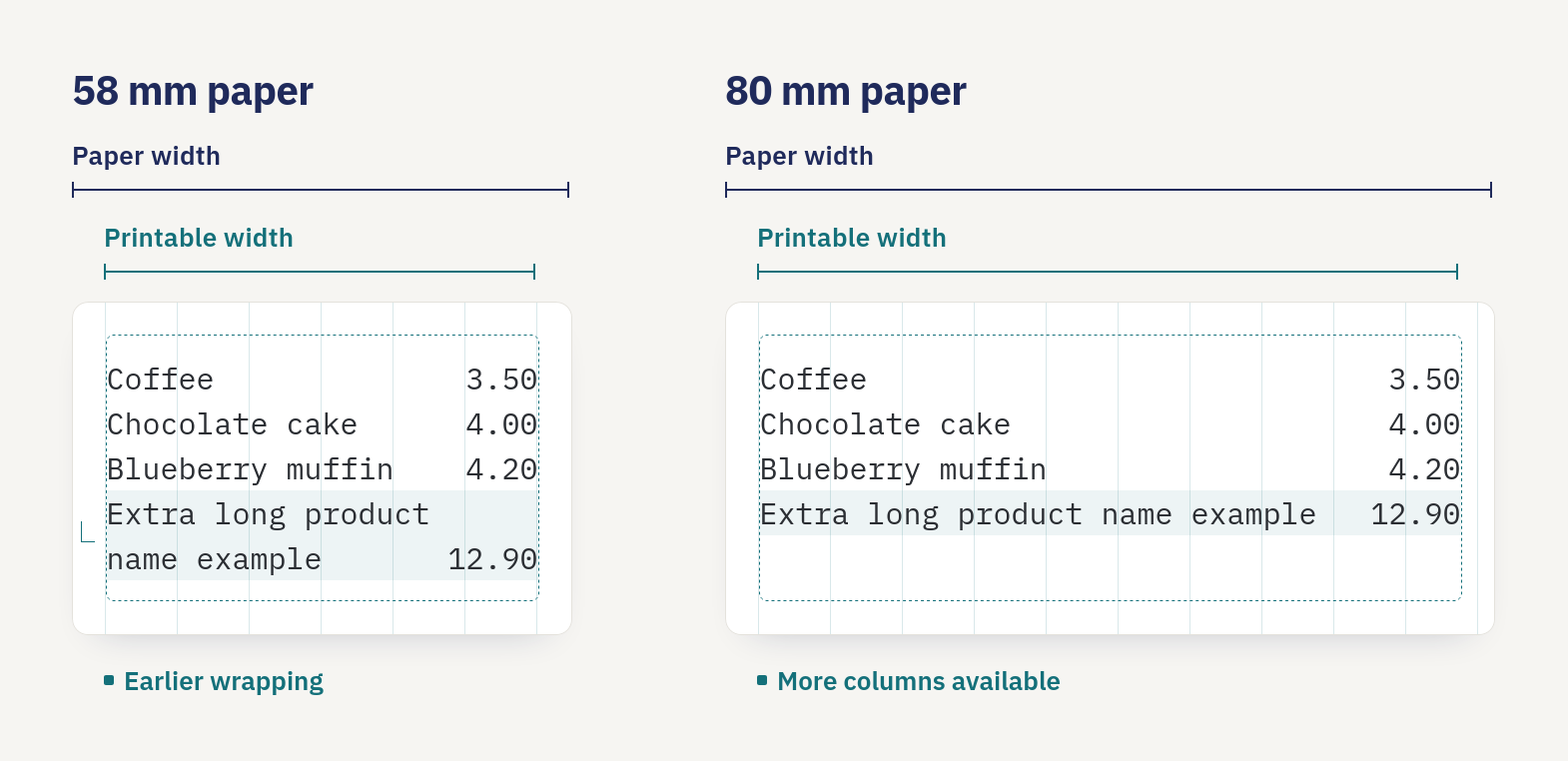
That calculation depends on the printer’s printable width, selected font, and character size. Paper width alone is not enough. On Epson’s TM-m30II-SL, 80 mm paper provides a maximum printable width of 576 dots, while the 58 mm configuration provides 420 dots.11 The number of text columns also changes with the selected printer font.
A receipt renderer therefore needs to wrap long names, align columns, and scale graphics to the printer’s actual dimensions. More elaborate layouts are often easier to render as monochrome images, trading compact native text for precise control over every printed dot.
Printing images
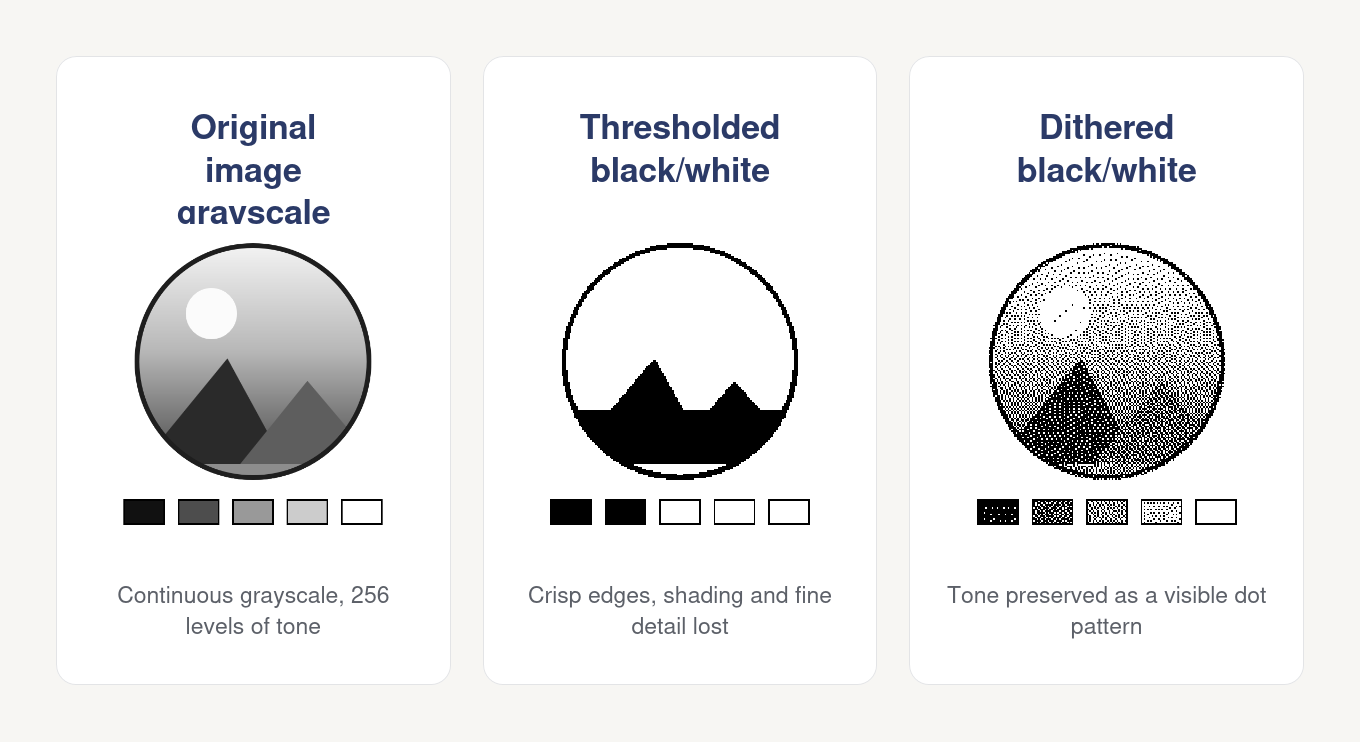
Logos, custom typography, and complex layouts are usually rendered by the application as monochrome bitmaps. The image is resized to the printer’s width, converted into black and white dots, and packed into the byte format expected by an ESC/POS graphics command.
For raster images, each bit represents a dot: 1 prints the dot and 0 leaves it blank. Grayscale must therefore be approximated through thresholding or dithering. The conversion method has a visible effect — a poor threshold can erase fine lines, while excessive dithering can make a clean logo appear noisy:
GS v 0 is a commonly implemented command for printing raster images. Epson now classifies it as obsolete and recommends the newer GS ( L and GS 8 L graphics functions instead.12 Support outside Epson’s printer range still varies, so the graphics command must be chosen for the target printer.
“ESC/POS compatible” does not mean identical
Even Epson’s own printers do not support precisely the same commands. Its ESC/POS reference includes an applicability matrix for each model and warns that customized variants may differ in supported commands, parameter ranges, and default values.13
Other manufacturers often provide ESC/POS as an emulation alongside their own command languages. Star, for example, documents mobile printers that can switch between ESC/POS and StarPRNT modes.1
Two printers may both handle the basic sequence —
- Initialize
- Print plain text
- Feed
- Cut
— yet differ in character tables, graphics and QR-code commands, image limits, cut modes, status responses, peripheral support, and firmware behavior.
Production systems often represent these differences in a printer profile: printable width, supported encodings, preferred graphics and cut commands, available status functions, and known quirks. The renderer can then target the printer’s actual capabilities instead of assuming a universal ESC/POS device.
Sending bytes is not the same as printing the receipt
A printing system should distinguish several stages:
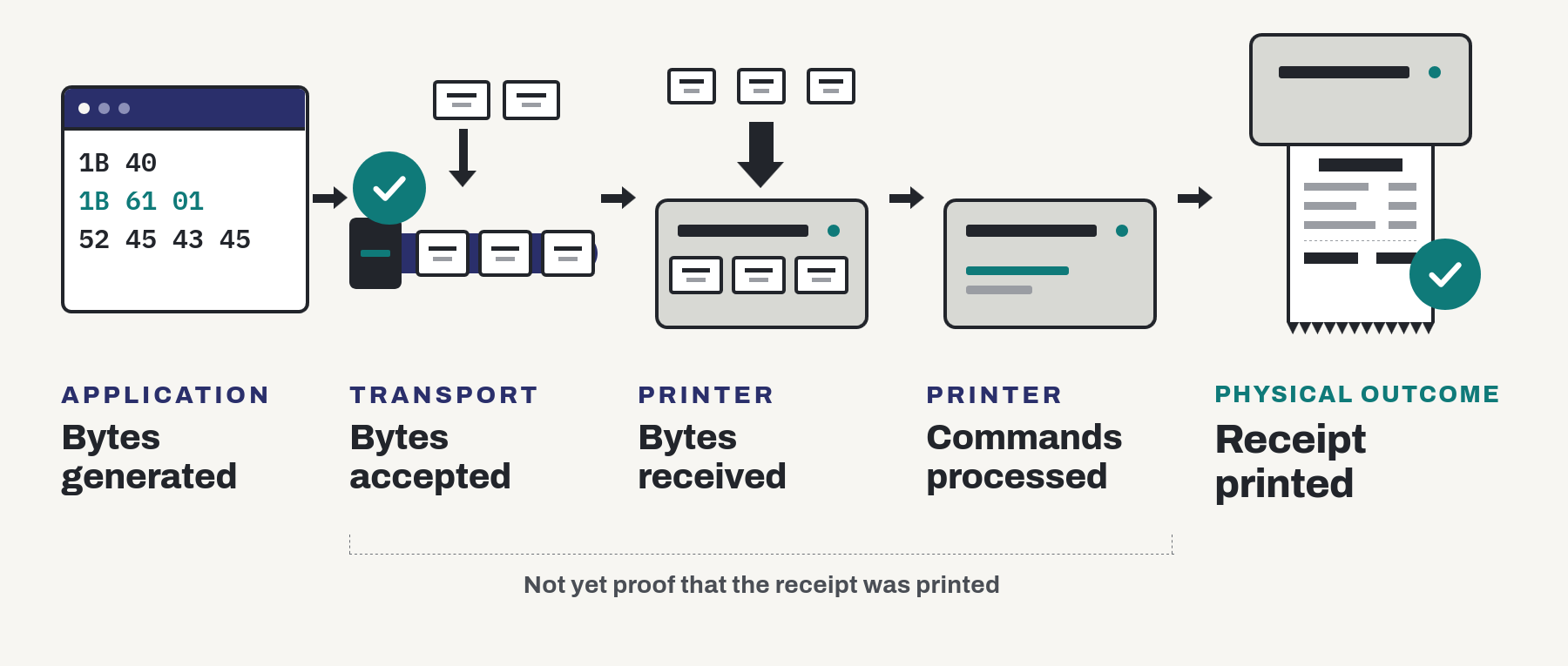
These stages do not necessarily complete at the same time.
Bluetooth makes the distinction particularly visible. Epson documents that data may remain in a printer’s Bluetooth module after the host application has finished transmitting it. Closing the connection too early can lose the buffered data, so Epson recommends confirming through printer status that printing has completed before disconnecting.14 Star documents the same behavior for several Bluetooth printer models.15
This uncertainty complicates retries. If a connection fails before completion can be confirmed, the application may not know whether the printer received nothing, printed part of the receipt, or completed it before the response was lost. Retrying may recover a missing receipt — or produce a duplicate.
ESC/POS provides commands for controlling the device and requesting status. Durable queues, job identifiers, retry policies, and duplicate prevention belong to the printing system built around it.
This is the key reliability boundary: ESC/POS can tell the printer what to do, but it does not by itself guarantee that the requested physical outcome occurred.
Where ESC/POS sits in modern POS systems
ESC/POS may be generated directly by the POS application or by an intermediary close to the printer.
Desktop POS
  → ESC/POS
  → USB or network printer

Browser POS
  → local print bridge
  → ESC/POS
  → printer

Cloud service
  → local delivery agent
  → ESC/POS
  → printer
Mobile applications may connect over Bluetooth, USB, or the local network, while kiosks and embedded systems often communicate directly with a fixed printer.
The surrounding software varies, but ESC/POS usually occupies the same place: it is the final device-level representation passed to the printer. Discovery, authentication, queuing, retries, and remote delivery belong to the layers above it.
ESC/POS is also not the only way to control a receipt printer. Vendors may provide operating-system drivers, platform SDKs, HTTP or XML interfaces, and proprietary command languages alongside direct ESC/POS communication.16
Debugging the byte stream
When a receipt fails, first determine whether the problem lies in the renderer, the transport, or the printer. Start with the exact bytes that were sent.
A practical workflow is:
- Capture the final byte stream and save it unchanged.
- Inspect it as a hexadecimal dump.
- Replay the same bytes without regenerating the receipt.
- Reduce the stream until only the failing command or content remains.
Replaying separates deterministic encoding and layout errors from connection or printer-specific behavior. Reducing the stream makes it easier to compare the command against the printer’s documentation.
Printer-side hexadecimal dump modes are especially useful when available. The Epson TM-m30II-SL, for example, can print every received byte as both a hexadecimal value and its corresponding ASCII character, allowing developers to compare what the application sent with what the printer received.17
Virtual printers complement this by making streams easy to inspect and replay without consuming paper. Physical testing remains necessary for firmware behavior, buffering, status responses, cutters, cash drawers, and the print mechanism itself.
A useful test strategy therefore has three layers:
Unit tests       → layout and byte generation
Virtual printer  → command interpretation and replay
Physical printer → transport, firmware, and hardware behavior
From commands to a production printing system
A first ESC/POS experiment may require only a few commands. A production system usually adds several layers:
Order or receipt data
        ↓
Receipt template and layout
        ↓
Text encoding and image rendering
        ↓
Printer profile
        ↓
ESC/POS encoder
        ↓
Delivery queue and transport
        ↓
Physical printer
Each layer addresses a problem ESC/POS itself does not solve: what the receipt should contain, how it fits the printer, which commands the model supports, and how the data reaches the device reliably.
ESC/POS remains the final instruction language. It can format text, print graphics and barcodes, cut paper, open a cash drawer, and report device status. But it does not provide templates, cross-printer compatibility, durable delivery, retries, or duplicate prevention.
That leads to the central lesson of this primer:
ESC/POS is simple at the byte level. Dependable receipt printing is a systems problem.
At Receiptful, that surrounding system is the focus: making sure the right receipt reaches the right printer across real networks, operating systems, transports, and hardware.
Footnotes
-
Star Micronics, PassPRNT Users Manual, “Emulation Changing.” Star documents portable printers that can switch between ESC/POS and StarPRNT modes. View the documentation ↩ ↩2
-
Seiko Epson Corporation, TM-m30II-SL Technical Reference Guide, Rev. D, “ESC/POS Command System.” Epson describes ESC/POS as a proprietary POS printer command system designed to reduce processing load on the host and accommodate future upgrades. View the guide ↩
-
Seiko Epson Corporation, ESC/POS Command Reference for TM Printers, “ESC @ — Initialize printer.” The command clears the print buffer and restores printer modes to their power-on state without clearing persistent data such as NV graphics. View the reference ↩ ↩2
-
Seiko Epson Corporation, ESC/POS Command Reference for TM Printers, “ESC a — Select justification.” Epson documents that the setting remains active until
ESC @is executed, the printer is reset, or its power is turned off. View the reference ↩ ↩2 -
Seiko Epson Corporation, ESC/POS Command Reference for TM Printers, “GS V — Select cut mode and cut paper.” The supported cut functions and behavior vary by printer model and mechanism. View the reference ↩ ↩2
-
Seiko Epson Corporation, TM-m30II-SL Technical Reference Guide, Rev. D, pp. 148–149, “Network Interface.” The guide documents a bidirectional TCP direct-printing socket on port 9100 for transferring print data and printer status. View the guide ↩
-
Seiko Epson Corporation, ESC/POS Command Reference for TM Printers, “ESC p — Generate pulse.” The command outputs a timed pulse to a selected drawer kick-out connector pin or, on supported configurations, a buzzer signal. View the reference ↩
-
Seiko Epson Corporation, ESC/POS Command Reference for TM Printers, “DLE EOT — Transmit real-time status.” The command can return printer, offline-cause, error-cause, and roll-paper sensor status. View the reference ↩
-
Seiko Epson Corporation, ESC/POS Command Reference for TM Printers, “ESC t — Select character code table.” The supported code tables and parameter ranges vary by printer model and regional version. View the reference ↩
-
Seiko Epson Corporation, ESC/POS Command Reference for TM Printers, “FS ( C, Function 48 — Select character encoding system.” Epson documents UTF-8 support for selected printer models and notes that
ESC tis ignored while UTF-8 is active. View the reference ↩ -
Seiko Epson Corporation, TM-m30II-SL Technical Reference Guide, Rev. D, pp. 137 and 142, “Printing Specifications” and “Printable Area.” The guide specifies printable widths of 576 dots for 80 mm paper and 420 dots for 58 mm paper, with character capacity varying by font and column mode. View the guide ↩
-
Seiko Epson Corporation, ESC/POS Command Reference for TM Printers, “GS v 0 — Print raster bit image.” Epson classifies the command as obsolete and recommends the graphics functions
GS ( LandGS 8 L. View the reference ↩ -
Seiko Epson Corporation, ESC/POS Command Reference for TM Printers, “Introduction.” The reference provides an applicability matrix and notes that customized models may support different commands, parameter ranges, or default values. View the reference ↩
-
Seiko Epson Corporation, TM-m30II-SL Technical Reference Guide, Rev. D, p. 68, “Bluetooth Interface.” Epson notes that data may remain in the Bluetooth module’s internal buffer after host transmission has completed and recommends confirming that it has been completely printed before closing the wireless connection. View the guide ↩
-
Star Micronics, Precautions for Using Bluetooth Printer, “Port close timing.” Star notes that data may remain in the printer’s internal buffer after application transmission has completed and that closing the port may discard it. View the documentation ↩
-
Seiko Epson Corporation, TM-m30II-SL Technical Reference Guide, Rev. D, pp. 114–115, “Application Development Information.” Epson documents control options including ESC/POS, XML command systems, platform SDKs, POS APIs, and operating-system drivers. View the guide ↩
-
Seiko Epson Corporation, TM-m30II-SL Technical Reference Guide, Rev. D, p. 105, “Hexadecimal Dumping Mode.” The printer can output received data as hexadecimal numbers and ASCII characters for comparison with the sending program. View the guide ↩
Keep reading