
How to print to a thermal receipt printer from your backend (without a print server)
Your server can't talk to a thermal printer directly, and standing up a print server is a lot of plumbing. Here is why the gap exists and how to close it with a single API call.
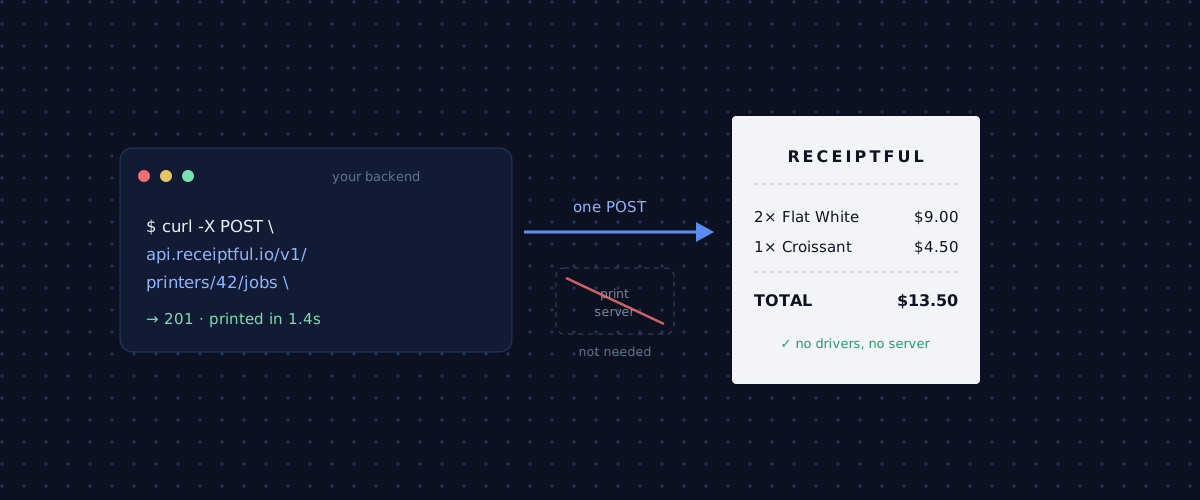
You have an order in your database and a thermal printer on a counter somewhere. Between them sits a surprising amount of nothing. Your backend cannot reach that printer, the browser cannot reach it either, and the printer speaks a protocol from the 1990s. This post explains why that gap exists and shows the shortest path across it.
Why your backend can't just print
A receipt printer is a local device. It connects over Bluetooth or USB to whatever machine is physically next to it, and it has no idea your cloud exists. There is no IP address to POST to, no webhook it listens on, nothing on the public internet to reach.
So the printer cannot come to your server, and your server cannot go to the printer. Something has to sit next to the hardware and bridge the two.
The web browser does not solve this for you. window.print() opens the OS print dialog and renders a page for a full-size sheet of paper. It does not know about 58mm rolls, it cannot open a Bluetooth connection, and it will not produce the crisp monospace output a receipt needs. For a thermal printer, the browser is the wrong tool.
The protocol problem: ESC/POS
Even once you can reach the printer, you cannot send it HTML or a PDF. Thermal printers speak ESC/POS, a command language Epson standardized decades ago. A receipt is a stream of bytes: escape codes to set alignment and font size, the text itself, codes to cut the paper and open a cash drawer.
Writing ESC/POS by hand looks like this:
1B 40            initialize
1B 61 01         center
1D 21 11         double width and height
"CAFE MILA\n"
1D 21 00         normal size
1B 61 00         left align
"2x Flat White ......... $9.00\n"
1D 56 00         cut
You can generate these bytes with a library like python-escpos or node-thermal-printer. It works, but now every layout change means poking at byte codes, and every printer model has its own quirks about which commands it supports and how many columns fit on the paper.
The traditional fix: run a print server
The classic answer is to put a small machine next to the printer and run a print server on it. CUPS, a Node service, a Raspberry Pi with a queue. Your backend talks to that box, the box talks to the printer.
This works, and for a single fixed location it is fine. At any real scale it becomes a job:
- Every location needs its own always-on machine and network.
- You maintain and update software on hardware you do not physically own.
- Bluetooth pairing, USB permissions, and driver quirks become your support queue.
- When a printer goes offline, you are the one writing the retry and queue logic.
- Rolling out a fix means touching every site.
None of this is your product. It is infrastructure you inherited because the printer is local and your code is not.
The shorter path: make it someone else's problem
The plumbing above is the same everywhere, so the sensible thing is to not build it. That is what Receiptful is for.
From your side it is one HTTPS call. You POST a receipt, we get it onto paper, and everything between the two, the local printer connection, the ESC/POS, the retries when a printer is busy, the per-model quirks, stays on our side of the line. You keep working in HTTP and HTML, the things you already know. There is no server to run, no drivers to install, and nothing to maintain at each location.
The whole setup takes a few minutes and printing is a single request after that.
What it looks like in practice
Pair a printer once in the console, then printing is a single authenticated POST. Send plain HTML and we convert it to ESC/POS for the paired printer:
curl https://api.receiptful.io/v1/printers/42/jobs \
  -H "Authorization: Bearer rf_live_3f9c…" \
  -H "Content-Type: text/html" \
  --data '<h1>Order #1284</h1><p>2× Flat White ......... $9.00</p>'
The API answers with the job it created:
{
  "id": 9281,
  "printer_id": 42,
  "status": "queued",
  "lifetime_seconds": 600,
  "created_at": "2026-07-15T10:24:01Z",
  "expires_at": "2026-07-15T10:34:01Z",
  "status_updated_at": "2026-07-15T10:24:01Z"
}
A second or so later, paper comes out of the printer. If you would rather generate the bytes yourself, you can still submit raw ESC/POS instead of HTML. Either way, your backend never opens a socket to a printer.
What about offline printers?
This is the part a homegrown setup usually gets wrong. Printers lose power, run out of paper, and wander out of Bluetooth range. A receipt that prints an hour late is worse than one that never prints, so every job carries a lifetime. If the device is unreachable, the job waits until the printer reconnects, up to the lifetime you set, and then expires instead of printing a stale order.
You can follow a job through its states by polling it: queued, notification_sent, notification_received, printing, printed. When something fails, you see exactly where.
When you still want a print server
To be fair, running your own is the right call in a few cases. If you have one permanent location and enjoy owning the stack, a Raspberry Pi and CUPS will serve you for years. If you are fully offline with no internet at the counter, a local server is your only option. And if your volume is enormous and predictable, owning the infrastructure can be cheaper.
For everyone else, the moment you have more than one location, or printers you do not physically babysit, or a small team that would rather ship features than maintain print boxes, an API earns its keep quickly.
Try it
Setup is a few minutes and the first 20 receipts each month are free, no card required.
Open the console and print your first receipt, or read the API docs first.